Best Table Tennis Robots of 2026

A table tennis robot is a very patient practice partner: it feeds balls at you at a chosen speed, spin, and placement so you can repeat a stroke until it feels automatic. What separates a good one from a frustrating one isn't the size of the ball hopper — it's whether you can change the setup in a couple of seconds, and whether the machine throws the same ball twice.

I've hit against machines that were more fun to set up than to use, and my team has now spent six months with nine robots, from app-controlled units to plain ball throwers. The ones people kept coming back to were quick to assemble, easy to aim, and versatile enough that a first-timer and a coach could both get something out of them. Spin and oscillation control ended up mattering more than we expected, while app and remote control earned their keep mostly on the nights we were alone at the table. Here are the ones worth your money.

1

Best Overall

Suz S201 Table Tennis Robot

85 /100
Lab Score Excellent

Key details

Weight
21.6 lb
Catch Net
Included
Balls Included
200
Max Table Thickness
Under 2.5 inches
View on Amazon

The catch net is what sold us. Two hundred balls go in the hopper, the machine throws them at you, and they roll back into a tray behind the table instead of spreading across the floor. That loop is the difference between a robot you use twice and one you use every week — you stop when your arm is tired, not when the floor is covered. Of everything here, this is the machine we keep coming back to.

Mounting is quick: a bracket clamps over the table edge, the head sits above the surface, and the net hangs off the far end. At 9.8 kg it is not something you will carry between floors, but it comes off the table as easily as it goes on, which is what matters when the table does double duty as a dining surface.

Spin, speed, and side-to-side oscillation each get a control you can set once and leave alone. The throw head is the part that fights you. Changing the trajectory means walking to the machine and re-aiming it by hand, so an adjustment mid-drill costs you the rhythm you were building. We set the angle first and practiced around it rather than chasing a perfect bounce.

What it does not have is any kind of drill programming — no app, no preset routine, no saved sequence. You set a shot and hit it until you own it. For a player working alone in a garage or a basement, that is a shorter path to playing than a pairing screen and a menu tree.

Pros

  • Catch net returns balls with no pickup
  • 200 balls included for long sessions
  • Clamps on and comes off in minutes
  • No app to pair or troubleshoot

Cons

  • Only fits tables under 2.5 inches thick
  • No preset drills or programmable sequences
Our verdict

Buy this for the least interrupted practice on the page: 200 balls feed the machine, the catch net returns them, and it comes off the table in seconds.

Check Latest Price
2

Best for Programmed Drills

PONGBOT NOVA S Pro

83 /100
Lab Score Excellent

Key details

Weight
8.8 lb
Control
App and remote
Ball Capacity
150 balls
Preset Drills
264
View on Amazon

Choose a drill in the app and the NOVA S Pro feeds the pattern: nine spin types, twenty-one speed levels, and a feed rate from thirty to ninety balls a minute. The 264 preset routines are the reason to buy it. They turn a ball thrower into something closer to a coach who never tires and never loses count.

We think that is worth paying for when you have a plan. A player working on a short serve into a loop can set the sequence, run it fifty times, and change one variable at a time. The dial machines cannot do that — you reset the shot by hand and trust your memory of where it was. What the app actually buys you is repeatability, and the robot delivers it: the ball lands where it landed last time.

The trade is that the control surface lives on a phone. Pairing is step one of every session, and when the link drops mid-drill you are standing at the table holding a phone instead of hitting balls. The bundled remote is not much of an escape hatch, with a display about an inch and a half square. The electronics also work harder than a knob machine's, so the one-year warranty carries more weight here than elsewhere.

At 8.8 pounds it is the lightest full-featured machine in this group, easy to lift off and stand in a closet between sessions. The 150-ball hopper is the compromise you accept for that: you will refill it sooner than you refill the Suz S201.

Pros

  • 264 preset drills plus custom programs
  • Nine spin types across 21 speed levels
  • 8.8 pounds, easy to move and store

Cons

  • Drill control depends on a paired app
  • Smaller hopper than the top pick
Our verdict

The one to buy if you practice from a plan: 264 preset drills, nine spins, and app control in a machine light enough to lift off the table alone.

Check Latest Price
3

Best for Thick-Top Tables

Practice Partner 20

82 /100
Lab Score Excellent

Key details

Weight
12 lb
Assembly
No tools required
Table Fit
Sits on any table
Serve Modes
1- or 2-bounce
View on Amazon

Nothing on the Practice Partner 20 clamps down. It sits on the tabletop wherever you set it, so there is no bracket to fit and no table thickness to measure — and it will run on the thick-top outdoor tables that rule out a clamp-on machine entirely.

Assembly is genuinely tool-free, and the control box is plain: speed from one to ten, an interval setting for how often a ball comes, a choice of topspin, backspin, or sidespin, and either a two-bounce serve or a one-bounce return. Anyone in the house can work it without the manual.

Where it surprised us is spin. This one puts a lot on the ball — enough that a beginner spends the first session just keeping returns on the table. There is no dial to turn it down, so the adjustment is placement rather than settings: back the machine up, drop the speed, and give yourself more time to read the bounce.

It is the priciest machine in this group and the least automated — nothing to pair, no saved drills, no sequences. What the money buys is a machine with no setup ritual, a control box a child can operate, and no table it will not sit on.

Pros

  • Sits on the tabletop with no thickness limit
  • No tools needed for assembly
  • Serves and returns from one machine
  • Sturdy build with an alloy feed unit

Cons

  • No ball catch net included
  • No power switch on the control box
Our verdict

Best for a table the others cannot clamp: it sits on top, goes together without tools, and puts heavy spin on the ball from the first serve.

Check Latest Price
4

Best Budget

Suz S101 Ping Pong Machine

79 /100
Lab Score Very Good

Key details

Weight
8.82 lb
Footprint
14.96 x 14.96 x 15.75 in
Balls Included
100
View on Amazon

A hundred balls come in the box, and at the bottom of the price range that is the difference between practicing tonight and waiting on a ball shipment. Against what the machine itself costs, the bundle is the reason it holds a place in this guide at all.

At 4 kg it lifts off the table with one hand and lives on a shelf between sessions, which is more than its bigger sibling can claim. The controls cover the basics — spin, speed, and direction — plus an oscillation sweep that moves the feed side to side so you are not hitting the same spot a hundred times.

That sweep is the first setting to explore and the one to be careful with. At full width it sends you well off the table, chasing balls you have no business reaching for. Start narrow and widen it as your footwork catches up; by the time you can cover the whole spread, the machine has earned its shelf space.

Pros

  • 100 balls included in the box
  • 4 kg, easy to lift and store
  • Adjustable spin, speed, and direction

Cons

  • No catch net, so sessions end in pickup
Our verdict

Our budget pick: a hundred balls in the box, spin and speed you can adjust, and 4 kg that comes off the table without a struggle.

Check Latest Price
5

Spin Variety

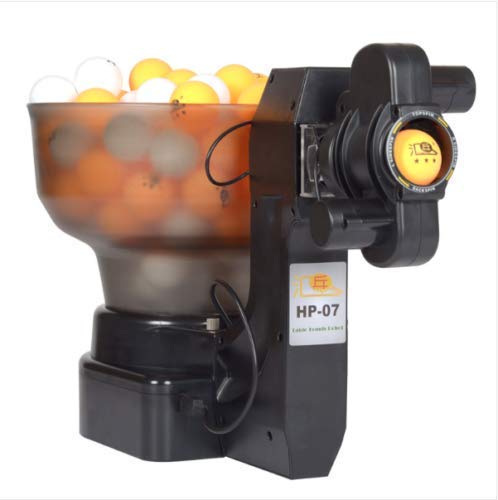
ZXMOTO HP-07 Ping Pong Robot

79 /100
Lab Score Very Good

Key details

Weight
5.29 lb
Ball Capacity
About 110
Spin Variations
36
View on Amazon

Thirty-six spin combinations, and not one of them comes from a menu. A selector switches between mechanical gears, each combination producing a different mix of topspin, backspin, and sidespin. No screen, no app, nothing to pair — just a dial and a ball coming at you with a spin you chose by hand.

The machine itself is small: 2.4 kg and roughly a foot in each direction, so it goes back on a shelf when you are done rather than living permanently on the table. The hopper takes about 110 balls, and it will serve to both ends of the table or just one, with the landing point wandering if you leave oscillation running.

Running it is a coarser experience than the app machine. The gear settings do not always hold where you left them, the variation between consecutive shots is limited, and the adjusting happens by hand between drills — which is exactly what we expected for the money, and what makes the thirty-six-spin spread impressive at this end of the range.

Pros

  • 36 spin combinations from mechanical gears
  • 2.4 kg and small enough to shelve
  • Single or double-end serve options

Cons

  • Balls are not included
  • Ball speed sags as the hopper drains
Our verdict

The widest spin menu at the lowest price tier here: 36 gear-driven combinations in a 2.4 kg package, if you supply your own balls.

Check Latest Price

How We Tested Table Tennis Robots

We started by gathering every robot we could find that was in stock and built for home players, then cut the list by the things that decide whether a machine gets used: how it collects balls, whether spin and placement are adjustable, whether it needs its own net, and what it costs relative to what it does. That left nine machines, from simple throwers to app-driven models, and we've been running them for six months on a garage table and a club table.

Each robot got the same first test: one person, a stopwatch, and the box. We timed assembly from opening to the first ball fed, then timed it again on the second setup, because nobody wants a twenty-minute build on a weeknight. Once it was running, we set a target at the far end of the table and fed 20 balls without touching a setting, counting how many landed near it — that told us whether the machine repeats itself or wanders.

Then we made it harder. We changed spin, speed, and placement mid-drill and counted the steps and screen taps it took, and we hit returns against heavy backspin to see whether the ball came back with real bite. We ran 45-minute sessions watching for jams, misfeeds, and balls left rattling in the hopper, and paired every app and remote from the far end of the table to see how far the signal held. After each session we counted the balls on the floor, since the recycling net is the difference between practicing and picking up.

Coaching drills and solo sessions both got a turn, and we noted which machines a beginner could run alone on day one and which needed a walkthrough. Value came down to that: the settings you'll actually use, not the longest feature list.

How to Choose a Table Tennis Robot

Start With Ball Handling

Two numbers decide how a session feels: how many balls the hopper holds and whether the machine gathers them again. A catch net turns a couple of hundred balls into a continuous loop. Without one, a hundred balls is a hundred trips to the floor, and the last ten minutes of every session belong to your back rather than your forehand.

A big hopper with no net is still a good machine — you just add a pickup net to the same order. What we watch for is the hopper itself: a 110-ball bucket runs dry during a long drill block, and topping up mid-sequence breaks the rhythm you bought the machine for.

Match the Controls to How You Practice

Three control styles cover this category: mechanical gears, a knob-and-switch panel, and an app with preset drills. Gears and knobs are set-and-go — nothing to pair, nothing to update, nothing between you and the first ball.

An app buys programming: canned sequences, saved routines, a drill you can repeat exactly. If you have a coach and a training plan, that is worth a lot. If you want thirty minutes after work, a dial is faster to live with. Before buying an app-controlled unit, confirm the app runs on the network where your table sits, because pairing becomes the first step of every session.

Check What the Robot Mounts To

Most machines clamp over the table edge, and the clamp has a limit — the Suz S201 tops out under 2.5 inches, which rules out many outdoor and thick-top tables. Measure the tabletop before you order, not after the box arrives.

A design that sits on the playing surface instead sidesteps the problem entirely and fits any table, though you give up the fixed reference point a clamp provides. Mark where it sits with a piece of tape so your placement is repeatable from session to session.

Plan for Weight and Storage

The robots here run from about 4 kg to 9.8 kg. The light ones lift off with one hand and go on a shelf; the heavy ones want to stay put, which is an advantage on a table nobody bumps and a nuisance in a room that gets used for anything else.

Decide before you buy whether the machine lives on the table or in a closet. A robot that needs two hands and a doorway to relocate is a robot that quietly stops getting switched on.

Frequently Asked Questions

Final Verdict

The Suz S201 is the machine we point most people to. Two hundred balls, a catch net that returns them to the tray, and a clamp that comes off the table as fast as it goes on — nothing else here removes that much friction from a solo session, and the manual controls leave you with one less thing to troubleshoot.

If you want programmed drills rather than a steady feed, the PONGBOT NOVA S Pro is the better buy and the app is the product. If your table is too thick for any clamp, the Practice Partner 20 sits on top and asks nothing of your tabletop at all.