Best Gaming Consoles of 2026

The hardest part of buying a gaming console isn't picking the most powerful one—it's figuring out which one fits the way you actually play. A console can be a living-room centerpiece, a handheld for the commute, or the thing everyone crowds around on a Friday night, and the same machine rarely excels at all three. What you're really solving for is friction: how fast you get into a game, how much storage you have before you start deleting things, whether the controller stays connected across the room, and whether the battery dies halfway through a handheld session.

Eight months, six consoles, and a lot of couch time later, my team and I have tested these machines in the places they actually get used: the main TV, a smaller bedroom TV, and handheld mode on commutes and weekend trips. We noted screen size and quality on the handheld-capable models in bright rooms and after dark, how each finish held up—including whether a white console stayed white—and what came in the box for the money. The best ones made gameplay feel immediate; the weaker ones had us waiting on downloads or hunting for an outlet. The picks below are the ones we kept reaching for after the novelty wore off.

1

Best Overall

Nintendo Switch OLED

95 /100
Lab Score Outstanding

Key details

Screen
7-inch OLED
Storage
64 GB
Play Modes
TV, tabletop, handheld
Multiplayer
Local, online, wireless
View on Amazon

The 7-inch OLED screen is the reason this model exists, and it is the part we notice every time we pick it up. Colors look richer, the larger panel makes handheld play easier to follow, and the adjustable stand finally feels steady enough for tabletop sessions. But the screen is only half the argument: the Switch OLED is the rare console that fits a shared living room and a solo commute without asking you to choose one.

We kept coming back to the flexibility. Dock it and you are playing on the TV; pull it out and the same game continues in your hands; prop it on the wide stand and two people can share the screen on a coffee table. The enhanced audio is a small upgrade, but it makes handheld mode feel less like a compromise. The dock also adds a wired Ethernet port, which is the kind of detail that matters when Wi-Fi is unreliable.

The 64GB of internal storage is generous by Nintendo standards, but it will not hold a large digital library forever; a microSD card is the simple fix, and game cards help if you prefer physical. Battery life is the one area where we keep a charging cable nearby, especially for longer handheld sessions.

This is not the console for someone who wants the sharpest 4K picture or the biggest ray-traced blockbuster. The PS5 Digital is the better home-theater machine, and the Series S is the smaller all-digital Xbox. But for most households, the Switch OLED is the one that gets played in more places, and that is why it earns our top spot.

Pros

  • Works on TV, tabletop, and handheld
  • Vivid 7-inch OLED screen
  • Wide adjustable stand
  • 64GB storage plus microSD

Cons

  • Joy-Con pairing can be finicky
Our verdict

We recommend the Switch OLED first for most people: it plays on your TV or in your hands, and the 7-inch screen makes handheld mode worth choosing.

Check Latest Price
2

Best for 4K Home Gaming

PlayStation 5 Digital Edition

94 /100
Lab Score Outstanding

Key details

Weight
8.5 lb
Storage
825 GB
Disc Drive
None
Resolution
4K
View on Amazon

The PS5 Digital Edition makes its biggest trade-off before you plug it in: there is no disc drive. Every game comes from the PlayStation Store, which means no used discs, no borrowing from a friend, and no resale. If your library is already digital, that is a clean convenience; if you like a shelf of game cases, this is the wrong version.

What you get for that trade-off is the best big-screen picture in this group. The PS5 outputs 4K, and the difference is obvious with large, detailed games on a good TV. We also appreciate how quickly games load; the console feels responsive in a way that makes switching between titles easy. The bundled Fortnite cosmetics and 1,000 V-Bucks are a nice extra if you already play, but they should not be the reason you choose this console.

The 825GB drive is the practical weak point. A few large installs can eat most of it, and because there is no disc drive, you cannot fall back on physical copies to save space. We wish Sony had given this edition more room, but the fix is straightforward: manage your library and keep only the games you are actively playing installed.

This is the console for the player who wants the best-looking version of a big PlayStation release and does not mind paying for the convenience of digital switching. If you want a lower-cost all-digital box for a smaller room, the Series S is the easier fit; if you want a console the whole family can use in different rooms, the Switch OLED is more flexible.

Pros

  • Sharp 4K output
  • Fast load times
  • Fortnite bundle extras

Cons

  • No disc drive
  • 825GB storage fills quickly
Our verdict

We recommend the PS5 Digital Edition for home players who want the best big-screen picture in this group and are happy to buy every game digitally.

Check Latest Price
3

Best Compact All-Digital

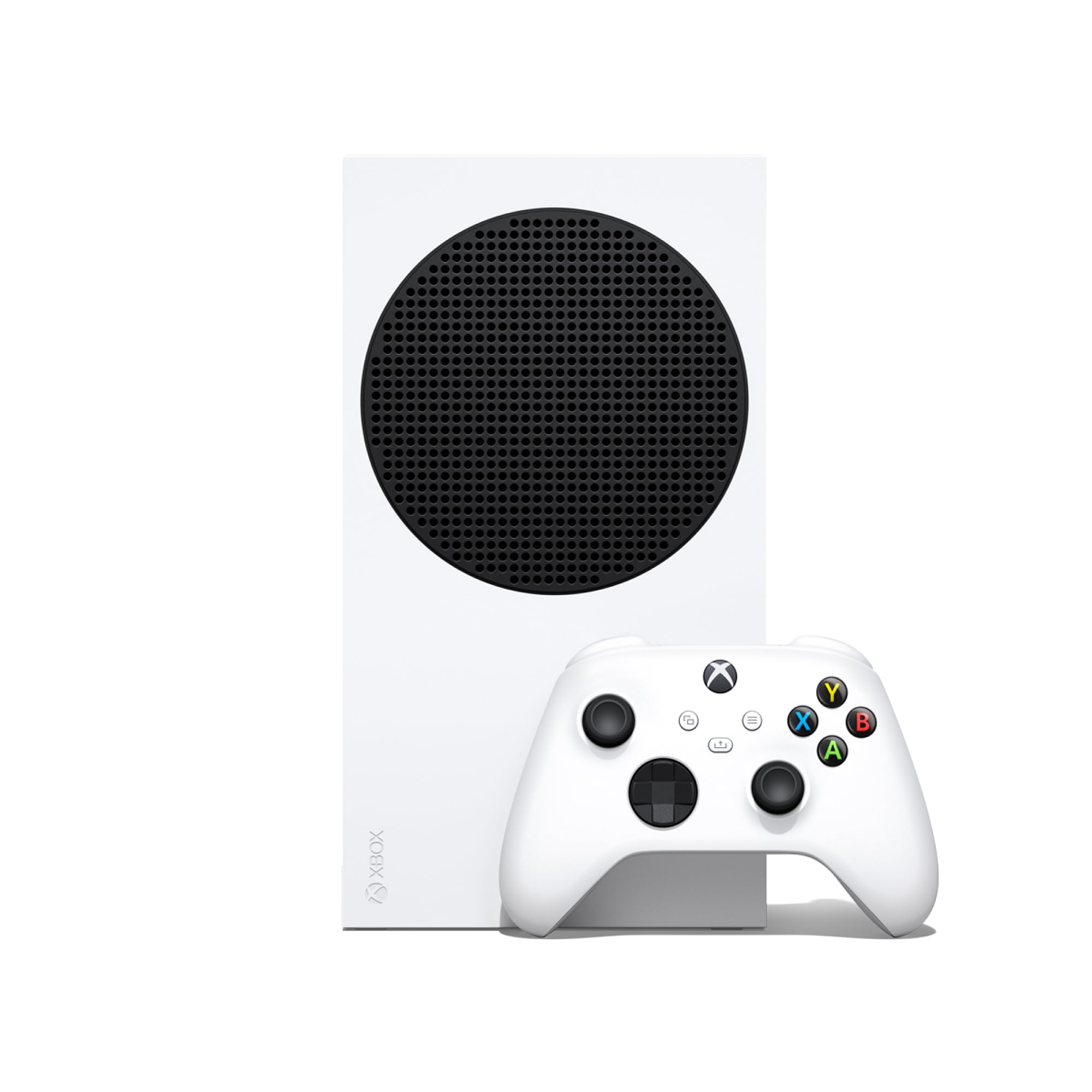
Xbox Series S

94 /100
Lab Score Outstanding

Key details

Storage
1 TB
Disc Drive
None
Frame Rate
Up to 120 fps
Resolution
1440p
View on Amazon

The Xbox Series S is the console that disappears into a TV stand. It is compact, all-digital, and small enough to sit on a shelf without becoming the center of the room. That makes it an easy second console for a bedroom or a smaller setup, especially if you already buy games digitally.

The 1TB SSD is the headline upgrade here. Games load quickly, and the console supports up to 120 fps at 1440p, which is a better match for a monitor or a smaller TV than a high-end 4K set. We like that the Series S does not ask for much space or attention; it switches between games with Quick Resume and plays digital games from four generations of Xbox.

The catch is storage. A 1TB drive sounds generous until you install a few large games, and because there is no disc drive, every purchase is locked to your account. Controller disconnects can also pop up, so keep the controller charged and re-pair it if it drops.

None of that changes the core appeal: this is a compact all-digital route into current Xbox games, and it is the one we point to when the TV stand is tight and the screen is not the center of the house.

Pros

  • Compact enough for tight spaces
  • 1TB SSD with fast loads
  • Up to 120 fps at 1440p
  • Quick Resume and four generations

Cons

  • No disc drive
  • 1TB storage fills quickly
Our verdict

We recommend the Xbox Series S for a compact all-digital setup where 1440p is enough and you want fast loads without a big console.

Check Latest Price

How We Tested Gaming Consoles

To build the shortlist, I started with the current consoles sold by the major platform makers, then filtered by price tier, physical size, and what each one includes in the box. We ended up with six units and spent eight months using them where consoles really live: the main TV, a smaller bedroom TV, and handheld mode on commutes and weekend trips.

We timed how long each took from a cold start to a playable game, played local multiplayer on the couch, and checked whether controllers stayed paired when we walked into the kitchen. Because two of the units are digital-only, we installed several large games and tracked how quickly the drives filled; we also noted how long it took to delete a game and redownload it over home Wi-Fi. I paid attention to gameplay feel—menu lag, stutter during busy scenes, and whether load screens broke up the fun—rather than trusting the box copy.

For handheld play, we ran 30-minute sessions at full brightness and noted battery drain, then compared screen size, brightness, and color in a sunny room and after dark. We also looked at the hardware itself: how the finish showed fingerprints, whether a white shell picked up smudges, and what came in the box versus what we had to buy separately.

How to Choose a Gaming Console

Start With the Games

Every console has a different library, and the exclusives are the real lock-in. The Switch is the home of Mario and Nintendo's family-friendly games, while PlayStation and Xbox lean toward big-budget cinematic titles and online shooters. Before you compare hardware, list the five games you are most likely to play in the next year and check which console actually has them. If the list is split, choose the console your friends use for online play.

Pick the Play Mode First

We care more about where you play than about the spec sheet. The Switch OLED is the only pick here that works on a TV, on a tabletop, and in your hands. The PS5 Digital and Xbox Series S are home consoles: they need a screen and a power outlet, and neither has a handheld mode. If your TV is often occupied, or you want to play on a commute, the hybrid design is worth more than raw graphics. If you mostly play in one room on a big screen, a home console makes more sense.

Match the Resolution to Your Room

4K output matters most on a large TV where you sit close enough to see the extra detail. The PS5 Digital targets 4K, while the Xbox Series S tops out at 1440p and is a better fit for a smaller TV or a desk monitor. The Switch OLED is built around its handheld screen, so its big-screen picture is not the reason to buy it. Spend on resolution only if your TV and seating distance can show it.

Plan for Storage and Discs

Modern games are large, and built-in storage disappears faster than the box suggests. The PS5 Digital has 825GB and no disc drive; the Series S has a 1TB SSD and no disc drive; the Switch OLED has 64GB and takes game cards and a microSD card. We treat the disc drive as a practical question, not a checkbox. If you borrow discs, buy used games, or like to resell them, an all-digital console is the wrong fit. Otherwise, leave room in the budget for extra storage.

Leave Room for Controllers and Subscriptions

Every console includes one controller, and local co-op usually needs a second. The Switch's Joy-Con can split into two small controllers for some games, but a full second controller is more comfortable for longer sessions. Online multiplayer on all three platforms generally requires a paid subscription, so factor that into the ongoing cost. A headset and a charging dock are optional, but they make a shared living-room setup easier.

Frequently Asked Questions

Final Verdict

For most people, the Switch OLED is the console we recommend first because it fits more rooms and more routines: dock it for the TV, prop it up for tabletop play, or take it handheld. If your priority is the best 4K picture for big-budget games, the PS5 Digital Edition is the upgrade; if you want a compact all-digital Xbox, the Series S is the one.

The right choice comes down to whether you value flexibility or top-end home performance.