Best Fighting Game Controllers for PC of 2026

You can know the combo cold and still lose the round to your own hands. Fighting games read inputs in fractions of a frame, and the difference between a pad, an arcade lever, and a leverless button box is the difference between a clean quarter-circle and a jump you never asked for. That's the actual job of a fighting game controller: not making you better, but making what you meant to do come out on screen. We've spent the past seven months with 10 of them hunting for the ones that get out of the way.

I came up on a pad, and switching to leverless took about two weeks before my fingers stopped fumbling, which is worth knowing if you expect it to feel natural on day one. The other thing new buyers miss: on PC, compatible can mean three different things, so confirm your pick registers as XInput in the game you actually play, and don't assume the button layout in the photos matches where your hands naturally rest. A few of these skip the touchpad entirely, which on PC is rarely a dealbreaker until you're navigating menus. The picks below are the ones worth the money.

1

Best Overall

8BitDo Arcade Stick

93 /100
Lab Score Outstanding

Key details

Mount
Universal arcade stick plate
Weight
4.6 lb
Software
8BitDo Ultimate Software
Connection
Bluetooth, 2.4G, USB-C
View on Amazon

It's the only stick here that cuts the cable and still takes standard arcade parts, and that combination is why the 8BitDo Arcade Stick is the one we recommend first. There are three ways to connect — Bluetooth, a 2.4G dongle, or USB-C — and it settled into Windows on all three without being asked twice. At 4.6 pounds it doesn't walk across the desk mid-match.

The parts are where the money goes furthest. The stock lever and buttons are perfectly playable, and the universal mounting plate takes a Sanwa lever and buttons when you want a different feel — the upgrade path most budget sticks don't give you. 8BitDo's Ultimate Software handles remapping and macros in the meantime, so you're not stuck with the stock layout while you decide.

Two things we noticed while playing. The button spread is wider than a classic six-button panel, which is comfortable in large hands and roomy in smaller ones. And the labels remap themselves as you switch modes, so the same eight buttons make sense on Windows and on a Switch without a cheat sheet in front of you.

The dongle compartment under the shell is the detail we didn't expect to care about. Nothing to lose, nothing to hunt for before a session, and no USB port permanently donated to a receiver. That's a small thing that stops being small the first time you're late to a lobby.

Pros

  • Connects over Bluetooth, 2.4G or USB-C
  • Universal plate takes Sanwa parts
  • 4.6 pounds keeps it planted
  • Dongle stows inside the shell

Cons

  • No PlayStation support
Our verdict

Our default for a first serious stick: it connects three ways, stays planted on a desk, and takes standard arcade parts when you're ready to upgrade it.

Check Latest Price
2

Best Premium Leverless

Qanba Sapphire S1

87 /100
Lab Score Excellent

Key details

Extras
Detachable wrist rest and strap
Weight
3.7 lb
Buttons
18 adjustable-throw
Connection
Wired USB
View on Amazon

A detachable memory foam wrist rest and a shoulder strap are not the features that usually sell a fight controller, but they're what makes the Sapphire S1 the one here built to leave the house. The rest clips off for desk play and back on for the trip, and there's a storage compartment for the parts you'd otherwise lose in a bag.

The buttons are the real argument. Eighteen of them, each with adjustable throw, so a press can be shallow for speed or deeper for feel, and they take Cherry MX switches if you want to change their character entirely. The profile switch stores several button maps, which matters more than it sounds — set your layout once and stop thinking about it. On a desk the rubber base does its job too; we never had to chase it mid-round.

It's PlayStation and PC only, and it's the premium pick here, so it earns its spot on the strength of the buttons rather than on value. If you've never played leverless, start cheaper: the Haute42 C16 will tell you whether the layout suits your hands before you commit this much.

Pros

  • 18 adjustable-throw buttons
  • Detachable memory foam wrist rest
  • Strap and built-in storage compartment

Cons

  • PlayStation and PC only
Our verdict

If you've settled on leverless, this is the one we point you to: tunable buttons, a wrist rest you can remove, and a strap for taking it to a session.

Check Latest Price
3

Best Fightpad

8BitDo M30

89 /100
Lab Score Excellent

Key details

Layout
Six-button face
Weight
4.8 oz
Connection
Bluetooth, rechargeable
Compatibility
Windows 10 and above
View on Amazon

Six face buttons in two rows and a cross-shaped D-pad is a Sega Genesis layout, and that's exactly why it works for fighters. Your thumb lives on the D-pad where the motion inputs happen, and the punches and kicks sit under three fingers that never have to move.

The D-pad is the part that matters. It's a proper cross rather than a disc, so a quarter circle is one clean roll instead of two attempts. On Windows it pairs over Bluetooth in seconds and shows up as a standard gamepad, with no software in between and no setup screen to get through first.

At 4.8 ounces it's the lightest controller here, and it spent a couple of weeks in a laptop bag without us worrying about it — the shell feels denser than the weight suggests. It also has a turbo function for games that want one, though nobody buys a pad for that.

What it isn't is versatile. Six buttons and two shoulders leave nothing for triggers or a right stick, so it's a fighting-game pad rather than a general one, which we think is a fair trade at the bottom of the price range. It's the least expensive way to find out whether a six-button layout suits you, and the one we hand to someone who plays on a modern console pad and wants to know what the fuss is about.

Pros

  • Six-button face keeps attacks under your fingers
  • Cross-shaped D-pad rolls cleanly
  • Light enough to live in a bag

Cons

  • Six buttons leave nothing for triggers or a right stick
Our verdict

The cheapest controller we recommend, and still a serious one: six buttons, a D-pad that rolls cleanly through quarter circles, and Bluetooth that pairs in seconds.

Check Latest Price
4

Best Value Leverless

Haute42 C16

87 /100
Lab Score Excellent

Key details

Size
11.8 x 7.87 x 0.53 inches
Weight
2.4 lb
Buttons
16 hot-swappable
Firmware
GP2040-CE on RP2040
View on Amazon

Press the back of the C16 and the top panel lifts away — no screws, no clips to break — so swapping artwork or reaching a switch takes seconds. That magnetic face is why this is the leverless pad we point people to first: the fiddly part of owning an acrylic pad is usually getting inside it, and here you don't need a tool.

Underneath sits a hot-swap PCB and the RP2040 running GP2040-CE, the open firmware that handles remapping, SOCD modes, and updates through a browser. The tournament lock switch matters more than it sounds: flip it and the extra buttons stop registering, so a palm brush during a set doesn't cost you a round. At 1.09 kg it sits flat and stays there.

The size is the thing to weigh. At 11.8 inches wide and about half an inch tall, it wants a desk rather than a lap, and there's no wrist shelf to lean on. Set it on a table and the layout gives your hands room; balance it on your knees and you'll feel the difference inside an hour.

Pros

  • Magnetic top panel lifts off without tools
  • Hot-swap sockets for new switches
  • Tournament lock switch stops stray presses
  • GP2040-CE firmware with SOCD modes

Cons

  • PS4 and PS5 play need an adapter
  • Panels ship frosted or clear at random
Our verdict

The leverless pad we suggest to anyone curious about all-button play: tool-free art panels, a tournament lock switch, and switches you can swap without a soldering iron.

Check Latest Price
5

Best Budget Stick

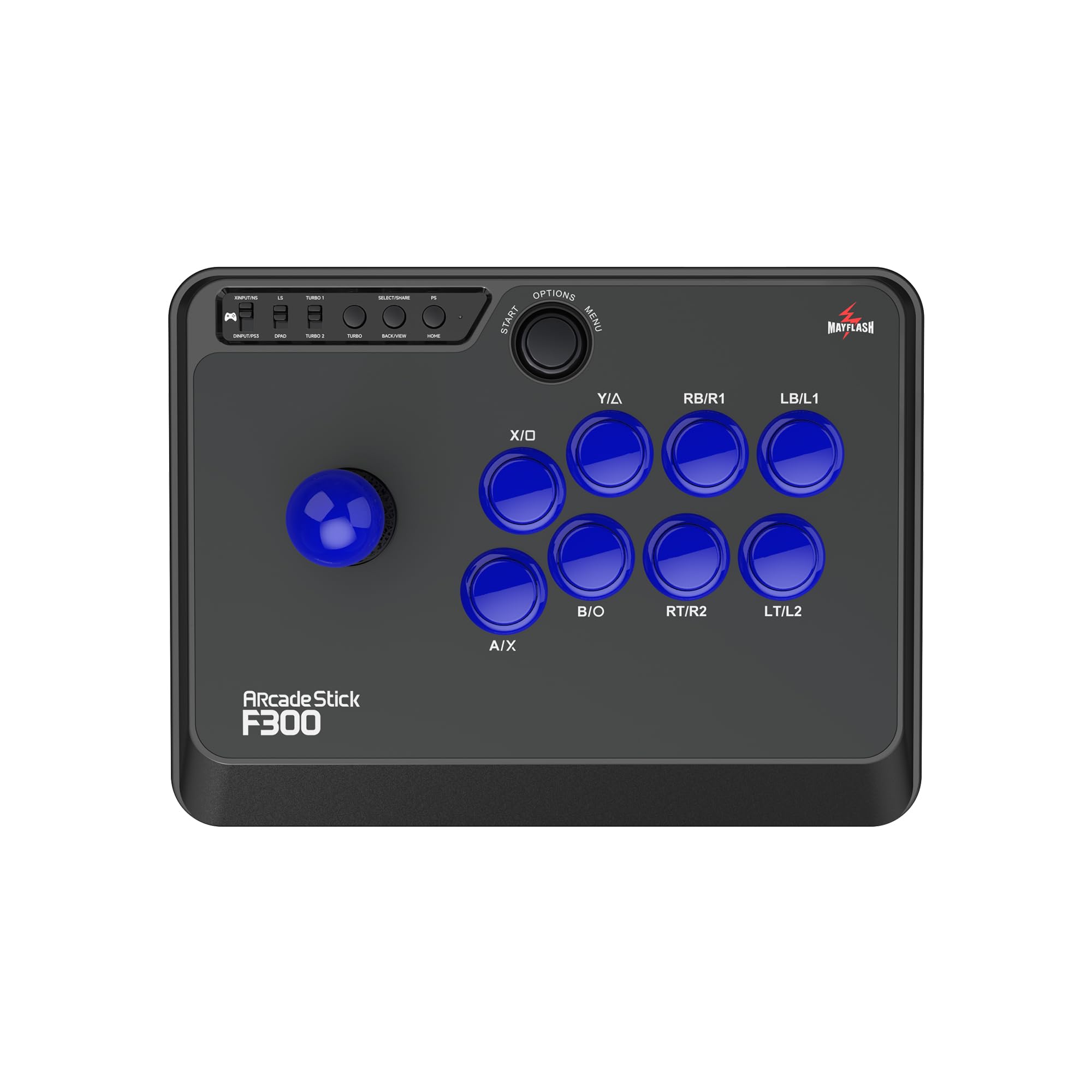
MAYFLASH F300

91 /100
Lab Score Outstanding

Key details

Modes
XInput and DInput
Mount
Sanwa-compatible
Turbo
Adjustable speed settings
Connection
Wired USB
View on Amazon

There's a small switch on the face of the F300 that decides what kind of controller it is: flip it and the stick reports as an Xbox pad on a PC, or as the older DirectInput device a pre-Xbox fighting game still expects. That switch is why it works almost everywhere — Windows, macOS, Switch, PS4, older Xbox consoles — and why it's the stick we suggest to anyone who doesn't yet know what they'll be playing on.

What you're buying is the chassis and the compatibility, not the parts. The stock lever and buttons feel mushy next to anything else here, and the mounting takes Sanwa components, so the natural path is to play on it for a month and then fit a lever and eight buttons. That upgrade path is the reason it keeps its place: the box, the cable and the switch are sorted, and the parts you'd change anyway are the ones you can change.

The gamble is longevity. Some units stop working inside the first month, and the stock parts are the weak link either way. For a first stick you intend to open up and learn on, that's an acceptable trade; for a controller you want to plug in and forget about, it isn't.

Pros

  • Mode switch covers XInput, DInput and consoles
  • Sanwa-compatible mounting for upgrades
  • Turbo with adjustable speed

Cons

  • Stock lever and buttons feel mushy
  • Some units fail within the first month
Our verdict

Our pick for a first stick on a tight budget: it talks to almost anything you plug it into, and the parts are easy to replace when you outgrow them.

Check Latest Price
6

Small Spaces

HORI Fighting Stick Mini

83 /100
Lab Score Excellent

Key details

Size
5.91 x 8.27 x 3.43 inches
Cable
8 feet
Weight
1.03 lb
Buttons
Eight-button layout
View on Amazon

At 467 grams and roughly the size of a hardback book, the Fighting Stick Mini is the only stick here you can carry in one hand. That's the whole idea: a real eight-button arcade layout that lives on a small desk, comes off a shelf when you want it, and goes back when you don't.

The 8-foot cable is the right call for a body this light. It reaches from a tower PC to a couch, and it doesn't drag the chassis off your knees the way a short, stiff cable does. The buttons are full-size despite the footprint — we expected them to be the compromise, and they aren't.

Where it gives ground is your hands. There's no rest for the heel of your palm, so a long session ends with your wrist doing work it shouldn't, and in large hands the layout feels tight rather than compact. It's a good first stick for a small space or a younger player, and a frustrating one for anyone who plays three hours at a stretch.

Pros

  • Light enough to carry in one hand
  • 8-foot cable reaches across a room
  • Full-size buttons on a compact body

Cons

  • No touchpad button for PS5 games
Our verdict

We keep this one for small rooms and smaller hands: a real arcade stick you can carry in one hand and set on a coffee table, though it's tight for large hands.

Check Latest Price
7

Playing on the Go

Haute42 G16

86 /100
Lab Score Excellent

Key details

SOCD
Multiple cleaning modes
Modes
Five input modes
Weight
1.28 lb
Buttons
16 hot-swappable
View on Amazon

Sixteen keys, a clear acrylic shell and RGB you can set to a character's colors: the G16 is the least expensive leverless pad here, and the one that fits in a bag. It carries five input modes, from XInput through to keyboard mode, which is the difference between a pad that works in every PC fighting game and one that works in most of them.

Small has an upside worth naming: on a cramped desk it leaves room for a mouse, which we noticed inside the first session. A full-size leverless panel takes the space your right hand wants; this one sits beside the keyboard and stays out of the way. The switches are hot-swappable, so the feel can change without a soldering iron, and the SOCD modes are switchable in the firmware if you play more than one game with different cleaning rules.

The catch is that it's small everywhere. In large hands on a lap there's very little to rest on, and the light acrylic body shifts if you're heavy on the buttons, so a desk is where it belongs. We think of it as the second controller: the one in the bag for a lunch break, while a full-size pad stays plugged in at home.

Pros

  • Fits in a laptop bag
  • 16 hot-swappable keys
  • Leaves desk room for a mouse

Cons

  • Cramped on a lap for larger hands
Our verdict

The one we reach for when desk space is tight: 16 hot-swap keys, five input modes and SOCD cleaning in a body small enough for a laptop bag.

Check Latest Price

How We Tested the Best Fighting Game Controllers for PC

We started by pulling every PC-friendly fight stick, leverless deck, and serious fighting pad we could find, then reading spec sheets, compatibility charts, and the grumbling in fighting game forums. Anything that needed third-party software to be recognized got cut, as did anything with a known button-doubling complaint and anything priced well past what the parts justified. That left 10 controllers, which we've now lived with for seven months. Every one got played rather than unboxed and photographed: hours of training mode, ranked sets, and local sessions where someone grabbed it mid-match and immediately complained about something.

Input accuracy came first, since that's what you're paying for. We ran the same quarter-circle and double-tap sequences a hundred times per controller in training mode and counted how many didn't come out, then repeated the drill after an hour of play to see whether warmed-up hands changed the result. We pressed each button in slow, deliberate bursts to feel whether it actuated near the top of the travel or bottomed out, and noted which ones rattled, stuck, or sounded hollow. Compatibility got checked the boring way: plug in, launch the game, confirm it registers without a remap.

Build quality we judged by handling, plus a little unfairness. We squeezed the cases, flexed the panels, and carried them to other people's apartments in bags. Size mattered more than we expected, because a wide leverless deck that sits perfectly on a desk can slide off a lap, and a couple of the smaller pads punished anyone with larger hands. We opened whatever could be opened, swapped gates, springs, and buttons where the manufacturer allowed it, and noted what needed a screwdriver versus what simply pulled out. Value, in the end, came down to what shipped in the box and how long each controller kept feeling the same as the day it arrived.

How to Choose a Fighting Game Controller for Pc

Lever, Leverless, or Pad

A lever stick gives you the arcade motion some players already have in muscle memory, but it needs a solid surface and a chassis heavy enough not to move. A leverless pad replaces the lever with four buttons: directional inputs get faster and more exact once learned, and there's a relearning period before the layout feels natural. A six-button pad is the cheapest and most familiar option, and the quality of its D-pad decides everything.

If you already play on a pad and only want a better D-pad, buy the 8BitDo M30 and stop there. If you want the arcade feel plus a chassis you can upgrade, start with a stick. If you've watched leverless players and want in, the Haute42 C16 is the least committing way to try the layout.

Connection and Input Lag on Windows

Wired USB is still the simplest thing to live with: no battery, no pairing, no receiver to lose, and nothing extra to charge before a session. A 2.4G dongle is the wireless option to pick if you sit back from the screen; Bluetooth works but adds a pairing step and is the most variable of the three on a PC.

The trap is assuming a controller that works on a console will be seen by an older PC game. Most modern fighters read an XInput pad, while older titles want DirectInput — and on the MAYFLASH F300 that's a switch on the face rather than a driver download. If a game still doesn't see your controller, open Windows' Game Controllers panel and confirm what the PC thinks is plugged in before you blame the game.

Buttons, Switches, and SOCD

Microswitch buttons click and register early; membrane buttons feel softer and wear differently. Spacing matters as much as the switch itself: a wide six-button spread suits large hands and can feel roomy in small ones, and a compact panel puts everything within reach at the cost of somewhere to rest your palm.

On a leverless pad, SOCD cleaning decides what happens when you press left and right at the same time, and different games and events expect different behavior. Buy a pad whose firmware lets you change it — GP2040-CE, which the Haute42 pads run, gives you the choice — and set it before you sit down to play rather than after.

Weight, Footprint, and Where It Sits

A light stick slides on a smooth desk and shifts on your knees; a heavy one stays put and doesn't travel well. Full-size leverless panels want about a foot of desk and give your wrists somewhere to land, while compact ones fit a small space and ask your hands to adapt.

Decide where the controller lives before you buy. If it stays on a desk, weight and grip are worth more than portability. If it comes out of a drawer, the 467-gram HORI Fighting Stick Mini or the Haute42 G16 makes sense, as long as you accept the compromise.

Modding, Repairs, and the Long Haul

The parts wear out before the chassis does. A stick with a universal mounting plate — the 8BitDo Arcade Stick has one — takes a Sanwa lever and buttons, and a leverless pad with hot-swap sockets takes new switches without a soldering iron. Either way, a five-minute job turns a controller you're bored of into one you want to use again.

If you never plan to open it, spend the money on the feel you want now and treat the controller as disposable. If you like tinkering, buy the chassis with standard mounts and upgrade as you go; the MAYFLASH F300 is the clearest example of that math.

Frequently Asked Questions

Final Verdict

The 8BitDo Arcade Stick is the controller we point most people to: it connects three ways, sits still on a desk, and takes standard arcade parts when the stock ones stop satisfying you. It is the least risky way to spend real money on a fight controller.

Spend differently only for a reason. Choose the Qanba Sapphire S1 if you've decided leverless is your layout and want tunable buttons with a travel kit, or the 8BitDo M30 if you'd rather keep playing on a pad and want the cheapest honest version of that.